Firefox Extensions - My Picks

Table of Contents
- Beware
- Add-on selection guidelines
- Add-ons
- Enterprise Policy Generator by Sören Hentzschel [privacy/security]
- Extension source viewer by Rob W [enhancement]
- Flagfox by Dave G [enhancement]
- Format Link by Hiroaki Nakamura [enhancement]
- LibRedirect by alefvanoon, ManeraKai [privacy]
- List Feeds by igorlogius [enhancement]
- Mark-It by Matt [enhancement]
- mozlz4-edit by Siarhei Kuzeyeu [enhancement]
- Redirector by Einar Egilsson [enhancement]
- Reverse Image Search by Andreas Bielawski [enhancement]
- Scroll Up Folder by Bruce Bujon [enhancement]
- Search Engines Helper by Soufiane Sakhi [enhancement]
- Skip Redirect by Sebastian Blask [privacy]
- Smart RSS Reader by zakius [enhancement]
- Stylus by Armin Sebastian [enhancement]
- uBlock Origin by Raymond Hill [privacy/security]
- UltimaDark - The Fastest Dark Mode Extension by ThomazPom [enhancement]
- Web Archives by Armin Sebastian [enhancement]
- Enabling add-ons on addons.mozilla.org
- Troubleshooting add-on related issues
- Listing removed add-ons
- Doing it without an add-on
- Giving back
- Recent changes
Mozilla Firefox is a popular, extensible, open source (mostly) web browser that is highly configurable and easy to use. Somewhat bare out of the box however, its functionality is easily extended with free 'add-ons', or 'extensions', of which there are many thousands on the Mozilla add-on repository at addons.mozilla.org (AMO).
Beware
With so many "free" add-ons you might be tempted to install lots of them, however i would strongly suggest installing only those you need since the potential to break things and compromise browser security and your privacy increases with every add-on you install.
Video: DON'T Install That Extension!
You installed them to make life easier. But some browser extensions are doing a lot more than blocking ads or autofilling passwords.
They're reading every keystroke. Tracking every site. Harvesting your data-and in some cases, handing it over to foreign governments or draining your crypto wallets.
In this video, we expose the chilling truth about browser extensions.
You'll see real-world cases of extensions that were hacked, sold, or designed from the start to exploit users.
And we'll break down why just checking permissions isn't enough-because malicious extensions often ask for the same permissions as the good ones. It's not about what they ask for. It's how they use it.
Another problem is unethical developers who include unwanted and unnecessary functionality which is not relevant to the primary purpose of the add-on. Often this results in data collection, tracking your web activities, injecting unwanted content in pages, such as ads, or worse, all of which i categorize as malware.
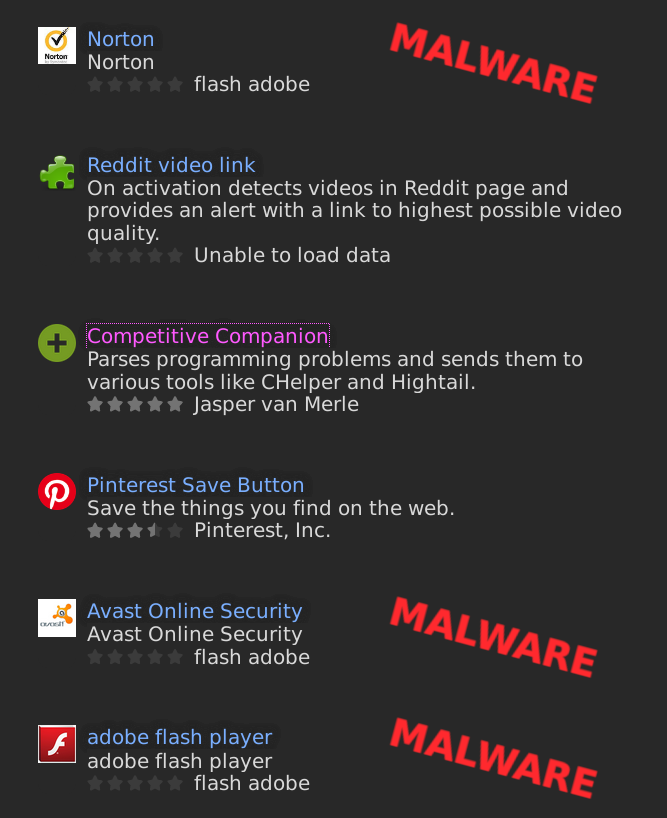
The problem of malware at AMO has grown exponentially as a result of a very flawed automated review process and the company's move to the WebExtension API which made it easy for unethical developers, who have infected the Google Chrome Store with their garbage, to port their add-ons to Firefox. Indeed, probably at least half of the add-ons at AMO are sketchy and many of the remainder are essentially useless. Although the Web Extensions API greatly limits what an add-on developer can do compared to the older XUL/XPCOM extension API, tracking, data collection and advertising are permitted and, on occasion, far more dangerous add-ons escape detection, some of which are used by millions of people, such as the plethora of VPN add-ons.
Add-on selection guidelines
You've been warned! Many extensions are accompanied by a warning on their AMO pages which indicates that the extension is not monitored by Mozilla and therefore is more risky to install. While monitored extensions -- those with a 'recommended' label -- are scrutinized more carefully and may be more trustworthy in general, many others are perfectly fine as long as you trust the developer and/or review the code yourself.
Tool-bar or FOOL-bar? Be very wary of tool-bar add-ons since many of these contain 3rd party spyware/malware components for monetization purposes.
Who the hell are you??? Always check to see what other add-ons the developer has created and how those are rated. Be wary when the developer is named as a company rather than an individual, or when their name is generic, such as "Firefox user" followed by a random number. See what kind of content is on the developers website if they link to one and look for marketing hype or unethical activity. Also be wary of developers that make it difficult or impossible to contact them or submit bug reports.
The 0-day 'bonus'. Never install newly released add-ons from a developer whom you're not familiar with, especially if it's their only add-on. Mozilla uses a deeply flawed automated system to evaluate add-ons, so wait at least a few days until others have had a chance to review it or flag it for removal. If the add-on quickly disappears or gets poor reviews, be thankful you didn't take the bait.
When "free" isn't. Always check the software license and be wary of developers who use a restrictive license, such as 'all rights reserved'. Most ethical developers will use a liberal, free software license, such as the General Public License (GPL) or the Mozilla Public License (MPL).
'We care about your privacy' ... LOL. If an add-on has a privacy policy, read it and see what data the add-on may collect, where it's sent, and how it's used. In general, if the document is a wall of legalese, it's probably a rotten privacy policy. Don't expect privacy policies to be accurate either. One of the best privacy policies i've run across is that written by the developer of the Stylus add-on:
Unlike other similar extensions, we don't find you to be all that interesting. Your questionable browsing history should remain between you and the NSA. Stylus collects nothing. Period.
Yes i can/no you can't. The Mozilla add-on website lists the permissions that add-ons require, however all permissions leveraged by an add-on may not be listed, or permissions which are not used may be listed, so don't trust this completely. That said, look for permissions that seem unnecessary given the expected functionality of the add-on.
What's under the hood? In general it's best to avoid developers that attempt to hide their source code. Most ethical developers will publish their work on platforms like GitLab, GitHub or Codeberg where people can submit proper bug reports and feature requests. In such cases there is usually a homepage and/or support link on the add-on page, or a link somewhere in the add-on settings, menus, etc., that leads to the code repository. If the source code is not published, you can still view it by decompressing the add-on or by using the excellent Extension source viewer (CRX Viewer) add-on.
You should always check the extensions manifest.json file and you don't have to be a geek to do so. You can use CRX Viewer to do this, or open the address about:debugging#/runtime/this-firefox in Firefox (or just remember the address about:about from where you will find the debugging page) and click on the 'Manifest URL' link for the extension you want to inspect. What you want to look for are any network links for unexpected addresses. For example, an add-on like Maximize All Windows (Minimalist Version) only modifies the behavior of Firefox, therefore there shouldn't be any remote addresses in the manifest. On the other hand, an add-on like uBlock Origin needs to intercept traffic for every website you visit, as well as be able to download filter lists and so on, and so its manifest contains http://*/*, https://*/*. and <all_urls>. Other add-ons may be dedicated to a single website, such as BitChute, and so bitchute.com should be the only remote address in the manifest.
He said, she said. Always read the user reviews to see how well an add-on is liked and be wary if it is rated 3 stars or less, or not rated at all, or was rated highly by only a few people. Often a developer will be the first to "review" their add-on, giving it 5 stars. Regardless of the rating however, always check the comments of the people that gave it the lowest rating to see if their gripes seem legitimate and whether they were addressed. That said, there are many add-ons that have been rated very highly by hundreds or thousands of people that contain malware, so don't give too much weight to user ratings alone.
But everybody's doing it! Many developers of hugely popular add-ons have been contacted by malware distributing 3rd parties wanting to buy their work or influence its development. Adblock Plus by Eyeo GmbH (Wladimir Palant) is used by millions of people, yet it is a glaring example of an unethical developer who created an "ad blocking" extension which allows ads by default. For larger entities, Eyeo GmbH charges advertisers 30% of the revenue from Adblock Plus users who click the ads, so not only does Adblock allow ads, it's also spying on its users and making a ton of money in the process. Giorgio Maone, the developer of the hugely popular NoScript add-on, engaged in similar chicanery a while back.
Should i or shouldn't i? If you're not sure whether you'll like an add-on, test it by downloading the .xpi file, then opening about:debugging#/runtime/this-firefox in Firefox and clicking the 'Load Temporary Add-on' button, or better yet, create a new Firefox profile for testing.
Automatic update MALWARE install. Automatic checking for add-on updates is fine, but always disable automatic installation of updated add-ons. Before updating an add-on, read the release notes to see what has changed and make sure the privacy policy, if there is one, remains strong. The problem with automatic add-on updates is that a developer may decide to monetize their work at any time and without warning, or sell their extension to an unethical party such as the developer of Stylish apparently did (not to be confused with Stylus). Ingo Wennemaring, the much-liked developer of the once popular All-in-One Sidebar add-on before Mozilla crippled the add-on API, warned about this in a blog post:
It was always very important for me to be honest and fair to the users. I had very good offers to sell the extension, but I didn't want to see that AiOS turn into adware or spyware.
HAVE I GOT A DEAL FOR YOU! I would strongly suggest avoiding any add-on that asks for or requires personal information or other data which could be used to identify, track, or profile you, or which is designed around monetization. Such extensions include, but are not limited to, those which promote coupons, discounts, free services, certain automatic form fillers, any add-on which stores data remotely such as many password, bookmark and synchronization add-ons, cryptocurrency add-ons, banking and other financial related add-ons, website/service specific add-ons marketed by corporations and many VPN (Virtual Private Network) add-ons.
Hide and seek. Regarding VPN add-ons, there are 172 234 269 of them at the time of this writing and most of them are highly suspect, yet millions of clueless people use them. Furthermore, a VPN add-on for a web browser may affect only browser traffic while leaving all other network traffic unaddressed, such as email and, potentially, DNS look-ups. If you want to use a VPN, and i would certainly recommend considering it, it should be incorporated at the system level or, even better, at the router level.
Add-ons
ClearURLs by Kevin R. [privacy/security]
ClearURLs automatically removes tracking parameters from clicked hyperlinks. This add-on is not needed if using uBlock Origin with the AdGuard URL Tracking Protection
filter list enabled (see the suggested settings for uBlock Origin page for more information).
Enforce Browser Fonts by Jayesh Bhoot [enhancement]
Enforce Browser Fonts allows one to choose whether to use the fonts specified by the website, or those that you have defined in Firefox preferences (Language and Appearance). Personally i hate when websites override my personal font choices and this extension takes care of that. Enforce Browser Fonts defaults to enabled and will remember the websites for which you disable it.
Caveats: For the privacy minded who enable Firefox's Enhanced Tracking Protection, forcing the use of your preferred fonts will increase the likelihood of your browser being uniquely identified. It can also uglify some websites.
Enterprise Policy Generator by Sören Hentzschel [privacy/security]
Enterprise Policy Generator helps to create a fixed configuration policy for Firefox that typically cannot be changed by the end user from within Firefox. While locking down certain browser settings is often done in a corporate environment, doing so can also provide some piece of mind in single or multi-user home environments.
Extension source viewer by Rob W [enhancement]
Extension source viewer is a handy and well thought out utility to quickly view the source code of a Firefox extension right from the Mozilla add-ons website without having to download and unpack it manually. The extension has the ability to search the contents of the files in the source code by prefixing the search with '!'.
Caveats: For advanced users.
Flagfox by Dave G [enhancement]
Flagfox is a neat utility that adds an icon to the address bar which represents the flag of the country in which the web server appears to be located. When the icon is right-clicked, a context menu is revealed with many more tools, such as a WHOIS lookup, URL shortening services and more. You can also add your own services.
Caveats: If you choose to display the menu icons, they are not stored locally and have to be fetched the first time you open the menu which some might see as a privacy issue.
Format Link by Hiroaki Nakamura [enhancement]
Format Link offers very flexible solutions for copying content and formatting it in different ways before pasting it elsewhere. In addition to formatting copied content as HTML, markdown, plain text, BBCode, etc., it can also preform additions, deletions and replacements on the copied content using regular expressions.
Caveats: The options interface was not well thought out. For example, a maximum of only 9 formatting options are available and there is no import/export capability, but it's still a more powerful solution than all other add-ons of this type that i tested.
Here's some of the formatting options i use:
Formats:
| Title | Format | HTML |
| HTML Page Link | <a href="{{page_url}}">{{title}}</a> | X |
| HTML Title+Sel | <a href="{{page_url}}">{{title}}</a>\n<blockquote><p>{{selected_text.s("\\n+|<br><br>","</p><p>")}}</p></blockquote> | X |
| HTML Linked Sel | <a href="{{page_url}}">{{selected_text}}</a> | |
| HTML Cleaner | <p>{{selected_text.s("\\n+|<br><br>","</p><p>")}}</p> | X |
| TXT Page Link | {{text}}\n{{page_url}}\n\n | |
| TXT Fragment Link | {{page_url}}#:~:text={{selected_text}} | |
| MD Title+Sel | [{{title.s("\\[","\\[").s("\\]","\\]")}}]({{page_url.s("\\(","%28").s("\\)","%29")}})\n\n> {{selected_text}} |
Global Replacements:
| Variable | Format |
| page_url | {{page_url.s("[^ -~]","NONPRINT")}} |
| selected_text | {{selected_text.s("<[^>]+>","").s("[\\u200B-\\u200D\\uFEFF\\u2060]","").s("“|“|”|„|″","\"").s("‘|’|′","'").s("˗|֊|‒|–|−|﹣|-|—","-").s("…","...")}} |
| text | {{text.s("[\\u200B-\\u200D\\uFEFF\\u2060]","").s("“|“|”|„|″","\"").s("‘|’|′","'").s("˗|֊|‒|–|−|﹣|-|—","-").s("…","...")}} |
| title | {{title.s("[\\u200B-\\u200D\\uFEFF\\u2060]","").s("“|“|”|„|″","\"").s("‘|’|′","'").s("˗|֊|‒|–|−|﹣|-|—","-").s("…","...")}} |
| url | {{url.s("[^ -~]","NONPRINT")}} |
LibRedirect by alefvanoon, ManeraKai [privacy]
LibRedirect redirects many websites, such as YouTube, Twitter, Instagram, Reddit, TikTok, etc., to alternative front-ends that are more respective of user privacy. While there are many such add-ons, LibRedirect is perhaps the best of them due to its many configuration options, its ability to automatically switch instances when a service is not responding, update the list of instances, add your own instances, etc..
Caveats: While most/all alternative front-ends are built with free, open source software and are more respective of user privacy, it is possible that those running the service may have modified the code to act in a malicious manner, however most of these alternative front-ends will work without enabling JavaScript.
The availability and working state of these services is in a constant state of flux. Part of the problem is the developers of privacy-hating platforms, such as YouTube, etc., who are constantly changing their code, sometimes specifically to thwart the use of privacy respecting alternative front-ends. Throttling is also a problem where a platform may limit requests from a given IP address. LibRedirect does offer some tools to help combat these issues however.
List Feeds by igorlogius [enhancement]
List Feeds detects whether a website offers news feeds (RSS, ATOM, etc.). Some time ago the M&Ms (Morons at Mozilla, corporate) decided to strip all support for detecting and reading news feeds at a crucial time when news feeds were never more important. The pitiful excuse the multi-billion dollar corporation gave was a lack of money and user interest, however i suspect this was done in order to steer people to "trusted" sources for their news rather than independent journalists. List Feeds essentially restores and enhances the feed detection capability which Mozilla removed, however another add-on is necessary to actually read them. Also see: How to access RSS feeds for websites that don't advertise one.
Mark-It by Matt [enhancement]
UPDATE: This extension is no longer available. I'm currently searching for a viable replacement. If anyone has any suggestions, please contact me.
Mark-It is was a simple, super handy add-on that replaces your new tab page with one that allows you to write notes in markdown format. I find this add-on to be really handy for storing commonly used bookmarks, notes and text that i reuse frequently.
You could play with the CSS i use to divide the page into two columns for less wasted space, plus make some other changes. You'll need to open about:debugging#/runtime/this-firefox and replace <Internal UUID> in the first line with the the Internal UUID for Mark-It. If the CSS doesn't load, be sure toolkit. legacyUserProfileCustomizations. stylesheets is set to true in about:config:
Click to expand...
@-moz-document url("moz-extension://<Internal UUID>/newTab/newTab.html") {
    /* display notes */
    html.dark, body.dark, textarea.dark {
        background-color: #252525 !important;
        color: #c8c8c8 !important;
    }

    #markdownTarget {
        width: 90% !important;
        padding-left: 1% !important;
        padding-right: 1% !important;
        font-family: unset !important;
        font-size: unset !important;
    }

    a {
        color: #97ff8d !important;
        text-decoration: none !important;
    }

    code {
        background-color: #000 !important;
        color: #ffa93b;
    }

    ul, ol {
        padding: 0 !important;
        margin-left: 20px !important;
    }

    #changeModeButton {
        background-color: #929292 !important;
        left: unset !important;
        font-family: unset !important;
        right: 33px !important;
        bottom: 90px !important;
    }

    #savingIndicator {
        bottom: 0px !important;
        left: unset !important;
        right: 0px !important;
    }

    /*columns*/
    .left {
        display: block;
        float: left;
        width: 49%;
    }
    .right {
        display: block;
        float: right;
        width: 49%;
    }

    /* edit notes */
    textarea {
        width: 90% !important;
        padding-left: 5% !important;
        padding-right: 5% !important;
        font-size: unset !important;
        font-family: unset !important;
    }
}
mozlz4-edit by Siarhei Kuzeyeu [enhancement]
mozlz4-edit allows one to edit, format and otherwise manipulate several types of compressed files including the search.json.mozlz4 file which is where Firefox stores all of its search engine plugins. If this is too much for you, try the Search Engines Helper add-on below.
Caveats: For advanced users.
Redirector by Einar Egilsson [enhancement]
Redirector automatically redirects selected pages, links and more to another resource of your choosing. For some examples of how you can use Redirector, see the Redirecting this to that section of the Firefox Tweaks and Fixes and Styles and Things page.
Note that Einar has died and the future of this extension is uncertain.
Reverse Image Search by Andreas Bielawski [enhancement]
Reverse Image Search is a privacy friendly add-on used to find different versions of a given image using 3rd party services such as TinEye. Reverse image searching is a great way to find higher resolution versions of an image, or to find when an image may have first been published to the web, the latter of which can be beneficial for researchers. Reverse Image Search also allows to add custom services to its menu.
Scroll Up Folder by Bruce Bujon [enhancement]
Scroll Up Folder adds an icon in the address bar that, when clicked, opens a list of the segments of the current document address. Clicking the list items makes it really easy to navigate up to a higher level of the address without having to manually edit it.
Search Engines Helper by Soufiane Sakhi [enhancement]
Search Engines Helper makes it really easy to add, import and export custom search engines for Firefox. It also allows using base64 code (data URLs) for the site icons.
Skip Redirect by Sebastian Blask [privacy]
Redirects sometimes happen when you click on a hyperlink expecting to go directly to the destination and, instead, your request is passed through an intermediary. Redirects are often used to track your browsing history or display ads before you are forwarded to the target domain. Skip Redirect simply tries to bypass this annoying behavior. I would suggest keeping the notification enabled when Skip Redirect does its thing as this makes it easy to troubleshoot a problem.
Caveats: May break the functionality of some websites in which case they can be added to a whitelist.
Smart RSS Reader by zakius [enhancement]
Smart RSS Reader is a well-rounded, multi-pane news feed reader and a pretty good one at that. There are a few little niggles with it, but overall it functions very well and the developer is friendly and open to suggestions. If you subscribe to multiple feed from the same domain, i might suggest setting the "Concurrent downloads:" preference to "1" in order to potentially prevent problems retrieving feeds.
While there is no dark theme option for Smart RSS, it does have an option to add your own CSS.
Note that the developer seems to have given up on maintaining this add-on.
Stylus by Armin Sebastian [enhancement]
Stylus is used to write, store and inject custom CSS styles into websites automatically, or even the entire web if you wish. Though there are many other extensions that can inject JS and CSS, working with Stylus is so much nicer. Note: Do not use Stylish, a similar add-on which the developer sold to an unethical party.
Caveats: For advanced users that have at least a basic knowledge of CSS.
uBlock Origin by Raymond Hill [privacy/security]
uBlock Origin is a superior content filter (or firewall, if you like) that can replace several other content/ad blockers including Adblock Plus/Edge, NoScript, etc.. It is capable of using the same filter lists as Adblock Plus/Edge as well as many more that they cannot. Two of the most welcome differences with uBlock Origin is that it does not slow page loading to any noticeable degree and it uses less memory then the competition. Another major advantage is that it can block both 1st and 3rd party requests for images, scripts and frames when configured to use its advanced mode. See my Firefox Configuration Guide for Privacy Freaks and Performance Buffs article for more information regarding uBlock Origin. Lastly, use only uBlock Origin by Raymond Hill and not any other ripoff.
Caveats: For advanced users. As with any content filtering extension, uBlock Origin has the potential to break website functionality until it is configured correctly.
UltimaDark - The Fastest Dark Mode Extension by ThomazPom [enhancement]
UltimaDark replaces Dark Background and Light Text (which replaced Dark Reader) as my preferred add-on for darkening the entire web. These darkening add-ons, of which there are many, change the colors used by all websites to a darkened version which many people find to be far easier on the eyes than the typical light background colors. Perhaps the biggest difference between UltimaDark and all the others is the novel approach the developer chose, which is to alter the CSS before the page is rendered. Although there's still a lot of work to be done, i think UltimaDark is the best of them and i've tested many. The developer is friendly and responsive to feedback.
Caveats: All of these 'dark web' add-ons fail miserably in some cases and UltimaDark is no exception, however it seems to work much better overall than all of the others i've tested.
Web Archives by Armin Sebastian [enhancement]
Web Archives makes it easy to find archived version of webpages. It is fairly configurable, though it does not have an option to add your own archive resources, nor does it have an option to send a webpage to an archive, however i find the latter unnecessary since the archive sites i use allow you easily archive a page if one isn't isn't found.
Enabling add-ons on addons.mozilla.org
By default Firefox does not allow add-ons to run on addons.mozilla.org/. If you want to override this behavior you can add the the following preferences to your user.js file or your user-overrides.js file if you're using the 'arkenfox' user.js:
user_pref("privacy.resistFingerprinting.block_mozAddonManager", true);user_pref("extensions.webextensions.restrictedDomains", "");
Troubleshooting add-on related issues
See Firefox Tweaks and Fixes and Styles and Things.
Listing removed add-ons
While i'm sure there's a more geeky way of listing extensions which one has removed, this one works for me: In your Firefox profile folder, navigate to /extensions/staged and there should be folders with the names of the removed extensions. You can delete this folder if you like.
Doing it without an add-on
The fewer add-ons you install, the better, and there's a lot you can do to customize Firefox without add-ons. See the Firefox Tweaks and Fixes and Styles and Things page.
Enhancing privacy and security
See: Firefox Configuration Guide for Privacy Freaks and Performance Buffs or The Firefox Privacy Guide For Dummies!
Giving back
If you like an add-on, or any other free and open source software, please donate to the developer. Trust me when i tell you that most developers of free software usually receive little or nothing for all the days/months/years of hard work they invest and the support they provide. Developers are usually very appreciative of donations regardless of how small it may be.
Recent changes
10-Feb-2025
- removed Privacy-Oriented Origin Policy
- updated various descriptions and fixed some busted links