How to download videos from almost any website (and why you should)

The web as we know it is dying. Contrary to the axiom, once on the web, always on the web, content is being deleted and delisted at an alarming pace by many of the Big Tech platforms including Google, YouTube, Twitter, Facebook, Instagram and others. Preserving it is therefore our personal responsibility.
Web pages are easy enough to download locally and archive remotely using services such as the Internet Archive and Archive.today (also see HTTrack). I would recommend the latter for archiving simple HTML pages (text/images) since the Internet Archive is also purging controversial content and thus is not a reliable archive. The website also practices what could be called 'soft censorship' where they force you to log in to your account in order to view certain content. Furthermore, it is my understanding that the Internet Archive obeys robots.txt directives which i think is a) stupid and b) problematic since an "archived" page can disappear.
Downloading and storing content locally in addition to archiving it on-line is important and, regarding video, there are many tools and a plethora of browser extensions for doing so. If you're considering the browser extension route, or already use one, i would generally advise against it. Way too many browser extensions contain malware in the form of telemetry/data collection, adware, etc.. One would be far better off using yt-dlp, a trusted, open-source tool which was forked from youtube-dl and which contains more features and is updated frequently. Both programs support a laundry list of websites in addition to YouTube. Several video downloading programs and browser extensions depend on one of these programs actually.
yt-dlp is a console program, however it is extremely easy to use in it's simplest form and graphical front-ends are available if you'd rather have a pointy-clicky interface. Tartube is one such example.
Here's a very basic example for using yt-dlp:
yt-dlp <video page URL>
So to download the video Ungrip by Ben Stewart which resides at https://www.youtube.com/watch?v=uliLfykURYo:
yt-dlp https://www.youtube.com/watch?v=uliLfykURYo
Some video platforms, such as YouTube, offer the video and audio in different formats and qualities. You can see which are available by using the -F option (case-sensitive):
yt-dlp -F https://www.youtube.com/watch?v=uliLfykURYo
This will produce something like the following (click to enlarge):
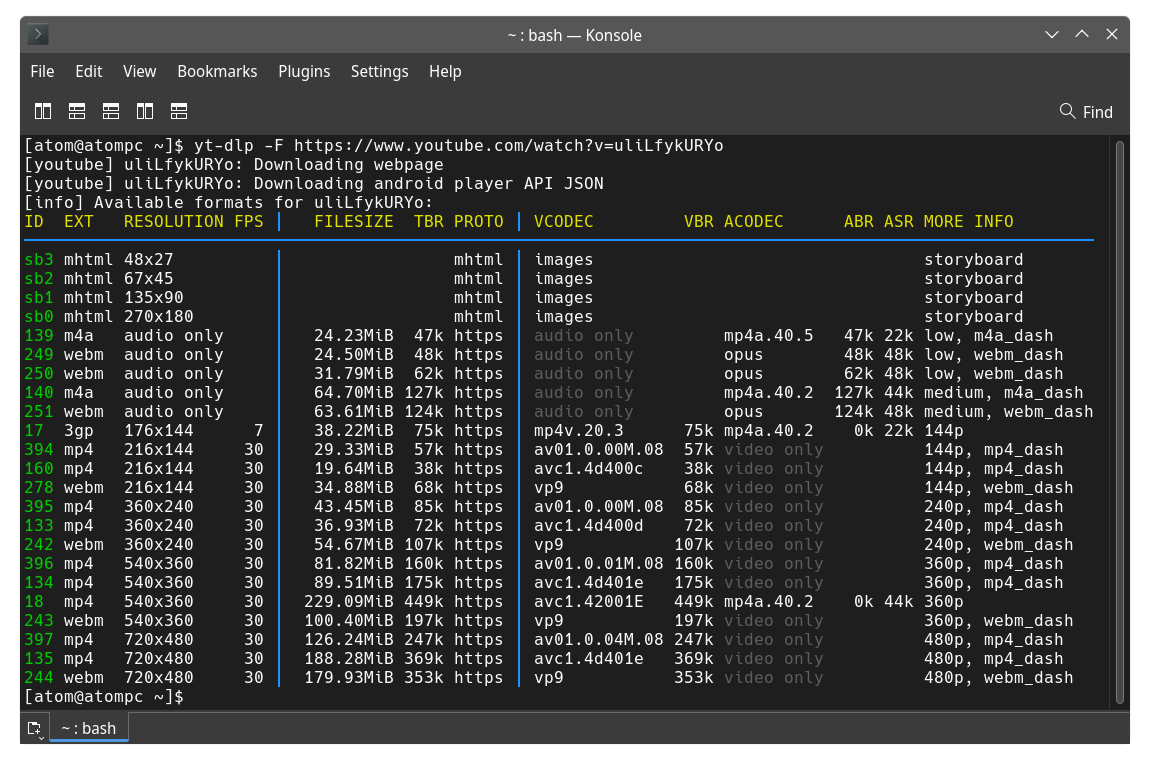
As you can see, the highest resolution available for the video is 720x480, however the audio isn't included. If you want the highest resolution video and audio you need not be concerned since yt-dlp will automatically select the formats 244 for the video and 251 for the audio in this particular case and merge them into a suitable container. If you require a specific video and/or audio format or resolution, you can do something like the following using the -f option (case sensitive) which will download the MP4 video and the Opus audio and then merge them into a suitable container:
yt-dlp -f 135+249 https://www.youtube.com/watch?v=uliLfykURYo
Or perhaps you want the audio only in Opus format:
yt-dlp -f 249 https://www.youtube.com/watch?v=uliLfykURYo
If you need help for yt-dlp:
yt-dlp --help or man yt-dlp to reveal the "man page" (manual) if you're using a GNU/Linux based OS
Please consider making an effort to stop uploading to, depending on, and supporting censorship-happy, Google-owned YouTube! Videos censored, de-listed and deleted by YouTube can often be found on other platforms including altCensored, the Internet Archive, BitChute (also check the Banned Youtube Videos channel), Blast.video, Brand New Tube, Brighteon, DTube, Gab TV, GoyimTV, gvid, Odysee, Our Freedom Tube, OurTube, Rumble, UGETube, VoluntaryTube and many others. You may not find the content you're seeking using Google, however you may find is using alternative search engines such as Mojeek. See: Alternative Search Engines That Respect Your Privacy.
Keep in mind that BitChute and some other platforms also remove videos and entire channels which do not appear to violate their ToS, though not nearly to the extent that YouTube does ... at least not yet.
Lastly, sometimes YouTube will de-list videos from their search results that can be found by searching the youtube.com domain using a 3rd party search engine. To do so we employ the 'site:' operator using any search engine that supports it, such as Brave Search, eTools.ch, MetaGer, Mojeek and some others:
"title of the video you're looking for" site:youtube.com
Remember kids, the web as we know it is dying. Don't be lazy about archiving content locally and re-uploading it elsewhere!